NV08 – Blogging & Social Media: Where do we go from here?

nv2008 Matt Mullenweg just finished up his keynote and is now answering questions from the audience. His talk about where we are now and where we need to go in the future started out really well, but kind of went downhill in my opinion. He began with the blogger’s hierarchy of needs:

  1. Expression
  2. Public
  3. Interaction
  4. Validation

I think these make a lot of sense. Bloggers seem to have an inherent need to express themselves, they like to do so in public and with other people, and they love checking their stats. My favorite and I think the most important is #2. I agree with Matt that public should be the default.
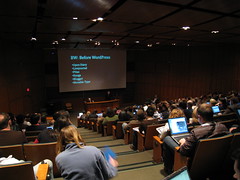
NV08 Keynote Next he made the comment that 4 million posts are created at wordpress.com each month. Wikipedia has about 2.1 million English-language articles, so Matt reasoned that wordpress.com users create about two Wikipedia’s each month. The only problem with that, of course, is that quantity does not equal quality. It’s kind of an apples and oranges comparison.

Matt then showed a funny video of the "dancing Matt", some dude who he is apparently neck and neck with for the top result in Google for "matt". He asked the audience to ensure they link to http://ma.tt so that he can remain #1. Are you kidding me? Does this belong in a keynote?

His next point was that technology companies suck at branding. He cited Google and Microsoft specifically, and used P&G as an example of a company that is great at branding. This wasn’t new for me, as I’ve done a lot of reading about branding, but it is good that Matt brought it up specifically. He didn’t say it explicitly, but I can only assume that he thinks we need to have better branding in technology in the future. A lot of his points seemed very loosely related to the title of the talk.

Matt finished up his talk by essentially professing his love for the open source movement. I agree with him that transparency is good and powerful, but I disagree that open source is the only way to get there. Matt thinks that we must create strong alternatives to commercial solutions. I think we can achieve transparency in other ways.

Stewart Mader liveblogged the keynote, so you might get a better idea of how it went down by reading his post.

It wasn’t a bad keynote, but I think the one Anil Dash did last year was much better. It was more powerful and left you with a great feeling. You can watch it here.

Ah well. Matt is easy to like and he’s a good speaker, but his keynote just didn’t do it for me.

MooseCamp2008

moosecamp2008 I’m not sure why, but I didn’t really get into the swing of things until this afternoon. Just wasn’t as enthused for MooseCamp as I have been in previous years. Maybe that’s because so much of it is repetitious. I mean, Kris Krug’s PhotoCamp sessions are always excellent, but they’re also always very similar. I’ve spent most of the afternoon in the Internet BootCamp. Despite being aimed at beginners, I don’t think the content has been all that introductory. It’s been interesting, for sure.

In the last session on liveblogging, someone mentioned that they found it odd that so many people are just snapping photos and uploading them without asking permission. Megan sympathizes, because she doesn’t like her photo being taken. I think that if you’re attending Northern Voice or any other tech conference, there’s an expectation that you’re going to get blogged, photographed, videotaped, streamed, Twittered, etc. If you are really uncomfortable with having your photo taken, you shouldn’t be here.

That might sound harsh, but that’s how I feel. I fully appreciate privacy and asking permission, but I think you implicitly give permission by attending. That expectation has been set.

Only a couple hours of MooseCamp left! The session we’re in now is called Traffic, Stats, SEO 101. Definitely one of my least favorite topics, but I didn’t want to give up the power outlet 😉

In Vancouver

Megan and I arrived safely this afternoon here in Vancouver. The flight was really short, I think we were almost 20 minutes early! Our accommodations are the same as last year (Triumf House) and once again the room is great. The place is so empty though, I don’t know why more Northern Voicers haven’t caught on. It’s about a five minute walk from the Forestry building where the conference is held.

We went to Vera’s Burger Shack for dinner tonight, a place I went last year too. It was yummy! We also made a stop at Starbucks, which was pretty nice of Megan considering she gave up coffee for lent. I guess she knows just how addicted I am 🙂

I thought I was quite prepared for the trip, but it turns out I forgot my toothbrush and also a wireless router (I usually travel with one). No big deal though, I’ll get a toothbrush tomorrow.

Looking forward to MooseCamp tomorrow!

Off to Vancouver for Northern Voice

nv2008 It’s that time of year again! Later this afternoon Megan and I are flying to Vancouver for the fourth edition of Northern Voice, Canada’s blogging and social media conference. And as usual, I’ve left far too many things until the last minute. Ah well.

Lots of people have asked me this, so I figured I should blog about it: I am not doing any recording this year (I did some recording in 2005 and again last year). I’m just going to enjoy the conference as an attendee. That said, I am bringing some recording devices. And a webcam…maybe we’ll have some live streaming!

There are lots of ways to follow along this weekend. Keep an eye on the nv08 and northernvoice tags at Flickr, and also on the NorthernVoiceBloggers channel on Jaiku. And of course, I’ll be twittering and blogging here.

Have a great weekend and I’ll see all you Northern Voicers shortly.

Format-shifting: HD DVD to Blu-ray

high def formats By now you’ve probably heard that Toshiba has thrown in the towel and will stop making HD DVDs. That means Sony has finally won a format war! Good for them, I guess. Not so good for the consumers who invested in HD DVD, however. What are you supposed to do with the player and all those discs that you bought?

One option would be to convert your HD DVDs to Blu-ray. Wired has created a “how to” specifically for that purpose:

By converting your movies to a more enduring format, you can ensure your movie collection survives the death of the machine that plays them.

The process is simple in principle but excruciating in practice, thanks to the complexity of the technology, the myriad of applications needed and the predations of an industry that doesn’t want you format-shifting at all.

The three basic steps are ripping, transcoding/authoring, and burning. Converting your discs will take time, and it will definitely cost money. Lots of money.

I’m not sure it’s worth it. You haven’t bought that many HD DVDs yet have you? And if you have, you’re probably better off trying to track down a dual-format player. It’ll save you a bunch of stress, that’s for sure.

Your HD DVDs may be salvaged, but your player is almost certainly a glorified paper weight now.

Read: Convert Your HD DVDs to Blu-ray

DreamSpark: Free developer tools for students from Microsoft

software DreamSpark is an awesome new program for students that Microsoft announced today. I wish they offered something like this while I was still a student. Heck, this might even be enough to sway some folks into going back to school for a semester or two! Here’s the description from Channel 8:

For once, something that sounds too good to be true really is this good and really is true. Starting today (or soon in some areas), students worldwide will be able to download our professional development and design tools for free! It’s called DreamSpark and it is upon us.

Nathan Weinberg sums it up nicely:

We’re talking over $2,000 in free software, just for being a college student. We’re talking a huge gift to students, letting classes teach this stuff without software costs, lettings students develop software without these costs, and letting any student pick up some stuff to play around with without a monetary commitment.

It’s important to stress that these are the professional versions of the software. You get Visual Studio 2008 Professional Edition and Windows Server 2003 Standard Edition, for instance. You could quite conceivably start a company while in school using Microsoft technologies and not pay a cent.

Pretty darn cool!

The program is currently available in eleven countries: Belgium, China, Finland, France, Germany, Spain, Sweden, Switzerland, the United Kingdom, Canada and the United States. I suspect the only reason China is on that list is because so many people there get pirated versions anyway.

Microsoft has always been really proactive about courting students. Other programs include Academic Alliance, Microsoft Student Partners, and the Imagine Cup.

Read: Channel 8 (includes a video introduction with Bill Gates)

Strange WordPress error

I was doing some work on the servers tonight, and as part of that installed the latest batch of Windows updates. Restarted the servers, and continued working on something else. A little while later my Dad texted me, and said the blogs were down. That’s strange I thought, everything looked like it was running fine. So I got on a test connection and loaded up my blog, only to find this message:

Your PHP installation appears to be missing the MySQL which is required for WordPress.

Bizarre! I hadn’t changed anything with WordPress, PHP, or MySQL. So I entered the message in Google and started going through results. (As an aside, is it just me or is the sentence grammatically incorrect? Specifically the part that says “the MySQL”…)

Lots of people have had this problem, apparently, and I went through dozens of search results until I found this one. His first five steps are the same as many other solutions, but his sixth step was new, and it actually worked for me:

add an environment variable “PHPRC” with the value of your php directory, this is key

That was key indeed. I have no idea why I didn’t need that before, and I have no idea why it makes things work now, but I’m glad it does. If you are unsure of how to add an environment variable, see this Microsoft support page (the steps are the same in both XP and Server 2003).

I suspect the solution to this problem is slightly different for everyone, but hopefully if you stumble across this post the PHPRC suggestion will help.

Read: Fighting Monsters

Notes for 2/18/2008

It was Family Day today in Alberta, so a holiday for most people. It seems I always post my notes on the holiday…ah well…here they are:

Party at Jane's house! Sharon cooking! Me cooking! Mack & Aimee Chicken Quesadilla

7-Zip: My favorite file archive tool!

7-zip As a self-described geek, I often have friends and colleagues ask me for advice on what tools they should be using. For example, when someone sets up a new computer, they often need some sort of tool for working with zip files, because the tool built into Windows XP leaves much to be desired.

WinZip is probably the most popular file compression utility, and WinRAR is also really common. My favorite though, without a doubt, is an open-source tool called 7-Zip.

7-Zip does everything you’d expect it to and more! And it does it better than WinZip in most cases. Not only does 7-Zip allow you to work with it’s own compression format (7z) but also ZIP, GZIP, BZIP2, and TAR for both packing and unpacking, and RAR, CAB, ISO, and a whole bunch of others for unpacking only.

The install is really quick and painless (the setup file is a mere 840 KB). What you end up with is the 7-Zip File Manager, a command line interface, and most importantly – Windows Shell integration! I use 7-Zip exclusively through the Windows Shell. For instance, to add a file or files to a new archive, just right-click and go to the 7-Zip menu:

add

If you choose “Add to archive…” a little window pops up that lets you configure the type of archive, as well as compression settings. Usually though, it’s easier to just pick the “Add to filename.zip” option. It’ll create the zip file right in the same directory.

Unpacking archives is just as easy. Simply right-click on any archive file, and go to the 7-Zip menu:

extract

Again you have a bunch of options, with “Extract Here” and “Extract to folder” being the two most useful. As you can see, in most cases the only 7-Zip interface you see are these context menus.

That’s my favorite part about 7-Zip: it does one thing and it does it well. It’s fast, and mostly stays out of the way. If you are sick of WinZip or WinRAR, or if you *gasp* use the Windows XP zip functionality, I strongly urge to you download and install 7-Zip!

Here is the 7-Zip website, and you can get the latest download here. Developers – you may be interested in the LZMA SDK (so that you can take advantage of the 7z compression format in your own applications).

Happy Valentine's Day with a text message

heart phone Holidays are always a good time for interesting statistics. How many phone calls were made? How many packages delivered? Or perhaps more interesting to my generation, how many text messages were sent? According to AT&T, Valentine’s Day is the most popular holiday for text messaging. Evidently there’s a 33% spike in texting traffic! That’s a lot of text messages.

I wonder what people are sending? A simple “I love you” or something more complicated, like FTBOMH IWALU (which translates to “from the bottom of my heart I will always love you”). Gizmodo has a handy list of these crazy combinations if you’re so inclined. Seems like more trouble than it’s worth to be honest, especially with the T9 functionality that all phones have.

I thought New Year’s Eve was the most popular holiday for text messaging, but maybe “drewheyman” has the right explanation in his comment on the Gizmodo post:

sending ‘happy new years’ = 1 message per friend. send txts to sig other for the sex = as many messages as it takes.

What will you be texting tomorrow?!

Happy Valentine’s Day 🙂

Read: Gizmodo