xkcd in the New York Times

As a kid I loved Calvin & Hobbes, but that was about the only comic strip I ever read. I think I have all the books except maybe one or two. I still don’t read comic strips, but I do occasionally enjoy reading xkcd, a “webcomic of romance, sarcasm, math, and language.” It was profiled in the New York Times yesterday:

The site, which began publishing regularly in January 2006, has 500,000 unique visitors a day, he said, and 80 million page views a month. (Why “xkcd”? “It’s just a word with no phonetic pronunciation,” his Web site, xkcd.com, answers.)

Here is one of my favorites:

Facebook defines relationships.

A new comic is posted every Monday, Wednesday, and Friday.

The author, Randall Munroe, is only 23 years old! He’s one smart cookie. He also writes a fairly interesting blog. I think this entry from November 2007 is my favorite:

I was thinking of getting a couch or something for my room, somewhere for guests to lounge around.

Fuck new couches. I now have a ball pit in my room.

That’s right, he has a ball pit in his room (click through for photos). Freaking awesome! And in February, he quintupled the size of it.

My congratulations to Randall on the coverage! Definitely check out xkcd if you’re looking for something fun and interesting.

Facebook's new profile design

facebook Last week Facebook reiterated that profiles will soon be redesigned. They’ve been working on the changes for quite some time now. On Wednesday they held a press event for reporters and bloggers:

Earlier today we had a small press event where we walked a few reporters and bloggers through the upcoming changes to the profile. We got to reiterate our intention of making the profile cleaner and simpler, and more relevant, while still giving you control over your profile.

If you head over to http://www.new.facebook.com you can see the new profile design in action. You can also check out the Facebook Profiles Preview Page for more information, and the ability to submit feedback on the new design.

My initial impression is that the design is very devoid of color. The pages are extremely white! I like that all of the application crap has been moved to the “Boxes” tab, and I like the focus on the feed (reminds me of FriendFeed). I’m not sure it makes sense to have the “Wall” entry form at the top of the page, considering the wall isn’t even visible. On the whole, it feels very rough to me. Not sure I like it.

I Love TripIt (And You Will Too!)

Late last year I came across TripIt, a free Web 2.0 travel organization service. TripIt helps you automatically build an itinerary, access it from multiple locations and devices, share it with others, and more. It also automatically includes maps and weather forecasts, among other information.

I’ve used TripIt four times now. The first was my trip to New York over Christmas. I managed to convince Sharon to join, and we built our entire itinerary using TripIt. I also used it for my trip to Yellowknife, for Northern Voice 2008, and for my recent weekend trip to Calgary. TripIt is dead simple to use, and once you get used to using it you sort of get addicted!

The way it works is you book your flights, hotels, car rentals, and restaurant reservations as you would normally. Then, forward your confirmation emails to plans@tripit.com. TripIt will automatically recognize the information, and insert it into your new itinerary. The only time this hasn’t worked for me was when we made our reservation at Bar Americain in New York (which supports OpenTable). I have to think that was a temporary glitch, because it has been flawless ever since (including our OpenTable reservation at Blink in Calgary). Megan booked the flights to Vancouver for Northern Voice, so I didn’t have a confirmation email to forward. I entered the information manually, and TripIt even made that easier – it knew the departure and arrival times and other information based only on the airline and flight number. Pretty cool.

tripit

That’s why I love TripIt – it’s just so deliciously simple! Forward the confirmation email and you’re done.

Sure you can add extra information and custom items to the itinerary, but TripIt does the heavy lifting and that’s what is most important. You can print your itinerary of course, and the formatting that TripIt provides is really clean and simple. If you forget to do that however, no worries – TripIt can send you your itinerary via email! You can send the command “get trip” to plans@tripit.com, and it’ll respond with your information. Or you can send something more specific, such as “get flight”. It’s really quite neat! You can learn more about the TripIt To Me feature here.

Some other handy features that TripIt includes:

  • The ability to share your trips with others. They can be either viewers or collaborators, meaning they can add items to the itinerary.
  • A travel guide for your destination. TripIt will load information from Wikipedia, Flickr, Eventful, and more.
  • See Who’s Close is a new feature that shows you when your connections (friends) are going to be near you at any given time.
  • iCal support, meaning you can load your itinerary up in Outlook, Google Calendar, and more.

As much as I love TripIt, it’s not perfect. Here are the top three features I’d like to see them add:

  1. Twitter and SMS support! Most other apps that I use on a regular basis (such as Remember The Milk) have this. Email is great, but Twitter and text messaging are better.
  2. Facebook widget. What I’d really like is for TripIt to do what dopplr does – show upcoming trips, and post an item to my news feed when traveling. If TripIt had this feature, I probably wouldn’t use dopplr anymore.
  3. Library of locations. When we went to NY, we added items like “Greenwich Village” and “Statue of Liberty” ourselves. It would have been really awesome if TripIt could have recognized those locations and automatically included relevant information (such as directions from/to our previous/next locations, pricing information, etc). This feature would make TripIt absolutely incredible!

If you’re just planning a quick road trip to see family or friends, TripIt may not be that useful for you. For all other kinds of trips however, I think you’ll find TripIt to be absolutely indispensable. I can honestly say I won’t travel without it anymore!

Searching Wikipedia Sucks!

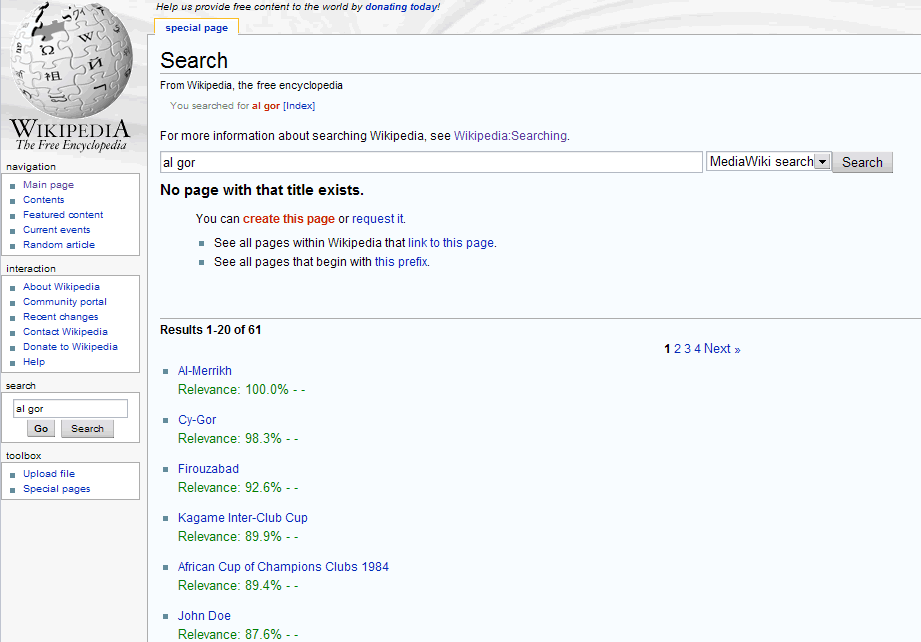
Post Image Have you tried searching Wikipedia lately? Don’t bother, because you probably won’t find what you’re looking for! I am continually amazed at how terrible the Wikipedia search results are. Here’s an example of what I mean. Go to Wikipedia, type “al gor” in the search box, and click the search button. You should see something like this. That’s right, the top results are Al-Merrikh, Cy-Gor, Firouzabad, and Kagame Inter-Club Cup.

Absolutely terrible! If you type the same thing in the search box at Google, not only do you get accurate results, but Google prompts you with “Did you mean: al gore”. Why yes, I did! So why is searching Wikipedia so bad?

Part of the problem is that Wikipedia actually has two search modes: “Go” and “Search”. If you type “Al Gore” (spelled correctly) in the box and click Go, you’re taken right to the entry about Al Gore. If you instead click Search, you’re taken to a list of articles that contain or reference “Al Gore”. You can read more about searching Wikipedia here. So they’ve sort of complicated things by including two buttons instead of just one. The Go button is useful when you know the name of the article you want, but useless otherwise.

The other part of the problem is that the search algorithm just plain sucks. I know they don’t have a lot of resources, but you’d think that one of the most popular websites on the web could have a decent search feature. Matching “al gor” with “al gore” is a problem that has been solved for years, yet Wikipedia doesn’t even come close to accomplishing it!

Wikipedia itself mentions external search engines as a way to find what you’re looking for, but they aren’t really much better. For instance, if you type “al gor” at the special Google search for Wikipedia page, you do get the correct Al Gore entry as the first result, but the rest are not relevant at all.

So here’s where we’re at. Google knows that if you type “al gor” you probably mean “Al Gore”. Wikipedia knows about all of the entries that reference “Al Gore”. What we need is a way to combine the two! Is that really so much to ask?

If you know of a better way to search Wikipedia, please let me know!

JihadOnYou: Declare holy war!

Post ImageI was reading Mashable today, and came across this post on a new website called JihadOnYou. Apparently the site was built over a single weekend – no word on how long it took them to come up with the name. Here’s the description from Mashable:

No matter what it is that has made your day a little bit more miserable, simply go to this site, rant about it, and “declare holy war” on it. Whether it be your annoying co-worker, an ex-girlfriend, the loaner car from the dealership, whatever it is, this is your place to rant. Other users then can rate your Jihad to decide if it’s worthy ala-Digg style.

Most of the comments at Mashable discuss the name, which could be described as offensive. To that I say bollocks!

If a word is “politically incorrect” or otherwise offensive, should you avoid it at all costs? My opinion is no. The word “jihad” will continue to carry the connotations it currently does only if we restrict its use. I don’t expect JihadOnYou to change the meaning of the word by itself, but every little bit helps. And yes, I realize that jihad is a word with a lot of history.

As for the site itself – it’s kinda neat! The about page says “we’re here to entertain, not educate” and to that end I think they have succeeded. It’s pretty hard to visit the site and not laugh!

Read: Mashable

NY Times article on Pownce made me laugh

Post ImageAfter writing my review of Pownce a few weeks ago, I figured I’d never write about the site again. However, after reading an idiotic article published in the New York Times yesterday, I knew I’d have to. Author Jason Pontin had me shaking my head right from the opening paragraph:

JUST now, the hottest startup in Silicon Valley — minutely examined by bloggers, panted after by investors — is Pownce, but only a chosen few can try out its Web site.

Hottest startup in the valley? News to me. Maybe three or four weeks ago. Anyway, let’s continue.

Within days, invitations were selling on eBay for as much as $10. Mr. Rose has declined all requests to be interviewed about the service, including my own. But as a consolation, he sent me a coveted invitation. I enjoyed the rare thrill of cyberhipness — and got to experiment with the site.

Coveted? Are you kidding me? Pownce tells me I have nine invites to give out. I’ve had them for weeks. I am positive I’m not the only one. Sorry Jason, receiving an invite to Pownce is anything but a hip cyber experience.

After some general information and background on Kevin Rose, Jason concludes that media executives should keep an eye on Pownce:

What struck me most was the site’s potential to be powerfully disruptive. Most file-sharing occurs on public sites, which can be monitored by media companies; if the users violate copyrights, the sites or the users themselves can be threatened into compliance or litigated out of existence (as happened with the original Napster). File-sharing on Pownce would be difficult to police.

If I didn’t know any better I’d think Jason was trying to make a joke. Because I sure laughed.

The RIAA has sued children, senior citizens, and everyone in-between. They’ve shut down company after company, and they’ve successfully petitioned ISPs for records detailing the activities of their subscribers. Somehow I don’t think policing Pownce (a system which knows exactly who is sharing what with whom, btw) would be a problem. Evidently Jason hasn’t heard of BitTorrent, which actually does make it difficult to police file-sharing (especially with the recent work done on protocol encryption).

I really wish the NY Times would stop publishing useless fluff pieces like this one.

I should mention that my main criticism of Pownce is set to be remedied soon – they are starting an API. Should be available in September, though the undocumented API that their desktop app uses has already been, um, documented.

Read: NY Times

The Gatekeepers of Privacy

Post ImageAs you know, I don’t worry that much about online privacy. In fact, I think it’s a huge waste of time to be overly concerned about privacy on the web. I always keep two things in mind:

  1. There is no such thing as private information.
  2. If someone looks at information online and draws a negative impression about me, I have larger problems than privacy to worry about.

So far my strategy has been working fairly well. To my knowledge I haven’t missed out on any opportunities because of information about me found on the web – quite the opposite in fact.

For some reason though, I am fascinated by the worries and concerns of others when it comes to information privacy. And believe, me there are a lot of worriers out there. So many, it seems, that Global TV‘s troubleshooter looked at the security of Facebook and other popular websites last night (unfortunately they haven’t full embraced the new web, and the video is not available on their site).

They contacted a local “hacking” firm, and asked them to review Facebook, Gmail, and other popular sites. The gentleman they spoke to couldn’t have been more cliché – long hair, super geeky, could be mistaken for a girl, you know the type. Anyway, they apparently spent over 30 hours trying to “hack” into Facebook and couldn’t get in. I just shook my head through all of this. They deemed Facebook “very secure”. Well, problem solved I guess, haha!

Then they spoke to a professor from the UofA (if I remember correctly) who said that living under the assumption that your information is safe is a dangerous thing to do. Finally someone smart! The segment then ended with the anchors asking each other if they were on Facebook (they aren’t, unfortunately). Oh and the suggestion that you should read the privacy policy of every site you visit (yeah, cuz that’s going to happen).

It doesn’t matter how secure Facebook is. Privacy is not about technology. If someone wants to find out something about you, they will. Social engineering, dumpster diving, and many other techniques are far more effective than trying to hack into a site like Facebook. More importantly, there’s no need to – just create your own Facebook account! Chances are, the person you’re interested in hasn’t adjusted their privacy settings anyway.

For its part, Facebook follows two core principles:

  1. You should have control over your personal information.
  2. You should have access to the information others want to share.

A respectable policy, no doubt. Here’s the problem though. Let’s say I give access to certain information only to my brother. No one else (in theory) can see it, right? Wrong. I can give my brother access to the information, but I can’t restrict him from doing something with it.

Technology is just a tool. People are the gatekeepers of privacy.

Why is Facebook so addicting?

Post ImageFor those of you who use Facebook this will come as no surprise: I’m addicted. I don’t know what it is about the site, but something has me completely hooked. Lately when I think social networking, I think Facebook – it seems to me they have found the magic formula. And I really want to understand what that formula is.

Here are a few “magic ingredients” that I have come up with:

  • Human Connection. I think it’s human nature to want to be connected to other humans. Obviously, this is the core of Facebook’s product. Sure you can share links and write notes and such, but the core idea is connecting with other people, and everything seems to be designed with this in mind (you can tag people in photos, notes, etc.)
  • User Interface. With the exception of the ugly banner on the left side, the site is clean and the layout is mostly consistent. I think for the same reason people love Google’s simple front page, people love Facebook’s simple interface.
  • News Feed. Aside from being an efficient way to display information, the news feed makes logging into the site many times a day worthwhile. There’s always something new to see. Try to imagine Facebook without the news feed…it’s hard isn’t it? This is a key feature.
  • Almost Live Casual Communication. I think Facebook is great for communication that falls somewhere in between instant messaging and email. Like a simple “hey how’s it going” that doesn’t require an immediate response, nor an entire email message (which would appear in your inbox alongside important messages and spam). The wall is definitely another key feature.

When they first decided to open the site up to everyone, expanding away from their original audience of college students, I wasn’t sure if it would work out. I figured it might make Facebook seem less attractive. Turns out my suspicions were wrong. Facebook is definitely going mainstream.

I’ll think about this some more, but what you do think – why is Facebook so addicting?

Oh, and if we’re not friends on Facebook yet, add me! Here’s my profile.

Clean & Hackable URLs

Post ImageA week ago, Roland Tanglao reiterated his love for clean URLs. Or perhaps more accurately, his hatred of dirty (?) URLs. Here’s what he wrote:

URLs with question marks, ampersands, etc should be banished to the Web 1.0 h*ll where they belong. I’ve been preaching the clean URL gospel for years but if I see one more WordPress blog with “?p” or one more Drupal site with “?q”, I’ll scream 🙂 Seriously if your webhost or your tech gal/guy can’t figure out how to use clean URLs, find somebody else. It’s 2007!

I couldn’t agree more. Here’s an example of what he means:

Dirty: http://example.com/articles.html?articleid=123&tag=rss
Clean: http://example.com/articles/123/rss

Clearly I prefer the second one, and I’m guessing you do too. I’m going to go one step further though, and say that not only should URLs be clean, they should be hackable! What does that mean? Let me give you an example:

http://mastermaq.podcastspot.com/episodes/FF7962/license
http://mastermaq.podcastspot.com/episodes/FF7962
http://mastermaq.podcastspot.com/episodes
http://mastermaq.podcastspot.com

The first link is for the licensing information of an episode. All you’ve got to do is “hack” off the end and you get the episode itself. One more hack and you get all the episodes. And finally, you’re left with the entire podcast. It’s pretty logical right? And it would be trivial to replace the episode ID with another one, or /episodes with /tags, etc. That’s what I mean by hackable – they are easily modified to get you where you want to go.

Here’s another example:

http://mastermaq.podcastspot.com/episodes/archive/2007/02/24

That will show you all episodes for February 24th, 2007. The URL is readable, and immediately you understand what it is doing. What if you want a different day? Replace 24 with something else. Just the month? Hack off the 24. You get the idea.

Clearly I am drinking the clean & hackable URLs koolaid, and as a result Podcast Spot has nothing but clean, hackable URLs. If you’re working on a web project, consider doing the same – your users will thank you for it.

Happy Birthday Yahoo!

Post ImageOn March 2nd, 1995 the site that started life as “Jerry’s Guide to the World Wide Web” incorporated as Yahoo (with an exclamation of course). I remember the early days, when all the pages had grey backgrounds and seemed to lack structure. It sure has come a long way. Tony Long at Wired explains:

Originally founded as a search engine/web directory, the company expanded rapidly through acquisitions to diversify into a full-blown internet service company, offering e-mail, instant messaging, social networking, online shopping and news, among other things.

I like Yahoo!, in case you hadn’t noticed, despite their growing pains.

And here’s a cool bit of trivia I just read on Wikipedia: if you click the exclamation point in the Yahoo logo on the homepage, you’ll hear the Yahoo yodel!

Read: Wired