I love Opera, I really do. It’s an awesome web browser, and it’s a shame that it doesn’t have more market share (most stats put it around 1% or less). I could go on for days about the many different reasons that Opera rocks, but here are my favorite ten (in no particular order, based on the latest version, 9.1):
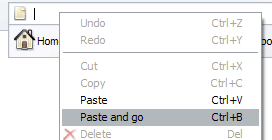
Paste and go (Screenshot)
This one really shows the attention to detail that the Opera team has. How many times have you copied a URL to the clipboard, only to go paste it in the address bar of your browser? Then you have to click go or press enter. With this handy feature, Opera saves you that second step. As the name suggests, you can paste and go all in one step!
Instant back and forward
I don’t think this is listed as an official feature, but it should be! In IE or Firefox, clicking back will usually take a few seconds for the previous page to reload – not so in Opera. As soon as you press back (or forward) the previous (or next) page is instantly there. Firefox is pretty good at this too, but Opera is quite simply superior.
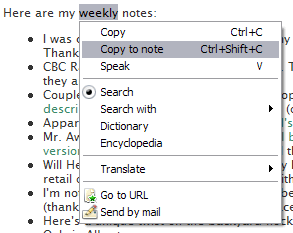
Highlighted Text Context Menu (Screenshot)
As soon as you highlight some text in Opera, a context menu appears with a bunch of useful commands at the ready. Again, it saves that extra step of right clicking after you have highlighted text. It might sound inconsequential, but it makes a huge difference.
Top 10 Sites (Screenshot)
Everyone has a set of websites they regularly visit. Opera is smart enough to keep track of these sites, and gives the ten most visited sites a special and easy-to-access menu. It’s kind of like automatic favorites. Very handy.
Notes
 After experiencing this feature, you’ll wonder how you ever got by without it. Ever keep notepad open while browsing so you can copy things you might need later? No need to do so with Opera! Highlight any text and you can then turn it into a note, or you can manually create a note with whatever text you want. Notes are associated with a website too, so you can quickly see your notes for a given page. Incredibly useful feature.
Better Tabbed Browsing
All modern browsers have tabbed browsing, but none of them do it as well as Opera does. For one thing, tabs are ordered (say you have three tabs, A, B, C. Click on A, then click on C, then close C. Opera goes back to A, the other browsers go to B). Again with the attention to detail, right click on any link and you have two options: open in a new tab (which brings it to the front) or open in a new background tab (which does not). Awesome.
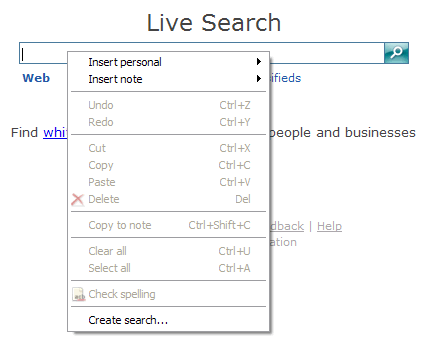
Search Keywords & Create Search (Screenshot)
 IE and Firefox handle search engines pretty well (with the search box I mean), but it’s pretty much up to the site developer to help the browsers recognize the search engine. Not so in Opera. Right click in any search box and choose “Create search…” and automagically you have a new entry in your search engines. You can also associate keywords with engines. So for dictionary.com, you might associate “d”. Then you can type “d word” in the address bar, and Opera will take you there.
Mouse Gestures
Of all my favorite features, this one takes the most getting used to. Essentially mouse gestures allow you to navigate or modify the window using only the mouse. Just another small feature that can save you a bunch of time.
Trash Can
 Have you ever closed a tab, only to realize a few moments later that you still need it? In other browsers you have to try to get back to the page again. In Opera, just click on the Trash Can, and choose the tab you closed. So damn handy.
Site Preferences
 This feature gives you the ability to modify preferences only for a given site. Want to turn off javascript just for one site? Opera lets you do it. Not a feature you’ll use daily, but it can definitely come in handy.
Like I said, I could go on! If you like what you see, you should definitely try Opera. It’s completely free, and there are no advertisements inside (much older versions had a banner). And if you’re afraid your favorite sites won’t load correctly, don’t worry. It’s increasingly rare to find a site that doesn’t work correctly in Opera. And actually, Opera is the only Acid2-compliant browser for Windows!
In fact, I have just one problem with Opera – my del.icio.us page loads incredibly slowly. I have no idea why, but I’d like to get it fixed. If you have any ideas, let me know!
UPDATE: It appears Opera simply doesn’t like my huge list of tags. I changed my del.icio.us preferences to display as a cloud, and only tags with at least 5 items, and now it loads very quickly!
Read: Opera

 A week ago, Roland Tanglao reiterated his love for clean URLs. Or perhaps more accurately, his hatred of dirty (?) URLs. Here’s what he wrote:
 Just got back from the Oilers game. The Blues were in town tonight, complete with a bunch of ex-Oilers like Dvorak and Brewer (both of whom got points tonight). The Oil came into the game having lost their last nine games, and I was hoping my presence would stop the streak from going to ten. It didn’t.
 Oh man I totally need to get me one of these!
  Here are a few interesting video-related posts I have come across in the last day or so:
 I have a love-hate relationship with
  I use Outlook all the time, so the many problems I have found with the newest version drive me nuts. Especially
  As you probably know, I have been recording
  The New York Post seems to think that
  MasterMaq's Blog